
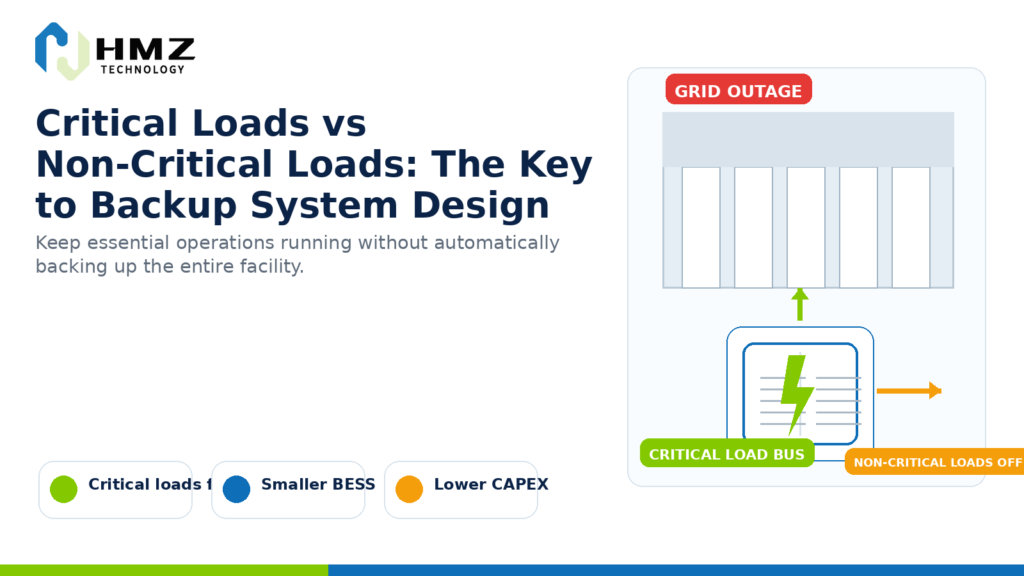
A factory may have a total electrical demand of 800 kW.
That does not necessarily mean it needs an 800 kW battery backup system.
During a grid outage, some equipment may have to remain online immediately.
Other equipment can stop for an hour without creating a serious operational problem.
That distinction is one of the most important steps in critical load backup design.
Before selecting battery capacity, the project should answer a much simpler question:
What actually needs to keep running when the grid goes down?
If that question is skipped, backup systems can become much larger and more expensive than necessary.
What Are Critical Loads?
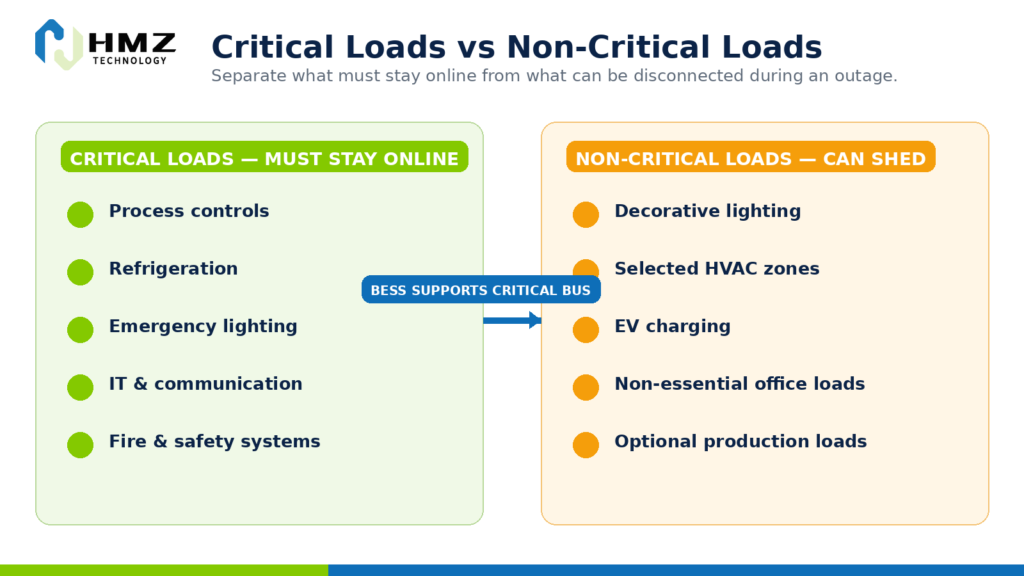
Critical loads are electrical loads that must continue operating during a grid interruption because shutting them down would create unacceptable consequences.
The reason may be:
- safety,
- product loss,
- process damage,
- data loss,
- environmental control,
- business interruption,
- or regulatory requirements.
Typical critical loads may include:
- process-control systems,
- refrigeration equipment,
- emergency lighting,
- communication systems,
- servers and IT equipment,
- fire and safety systems,
- medical equipment,
- selected production machinery,
- security systems,
- essential pumps.
The exact list depends on the facility.
A load that is critical in a hospital may not be critical in a warehouse.
A refrigeration compressor may be essential in cold storage but irrelevant in an office building.
That is why critical load backup must be defined site by site.
What Are Non-Critical Loads?
Non-critical loads are loads that can be temporarily disconnected during an outage without causing unacceptable damage, safety risk or operational loss.
Examples may include:
- decorative lighting,
- some office circuits,
- non-essential HVAC zones,
- EV charging,
- optional production lines,
- certain ventilation systems,
- non-essential equipment.
“Non-critical” does not mean unimportant.
It means the load can be interrupted for a defined period.
That distinction matters because battery backup is expensive.
Every additional kW of backup power and every additional hour of backup duration increases the required system capacity.
Why Critical Load Backup Should Not Start with Total Facility Demand
Consider a factory with:
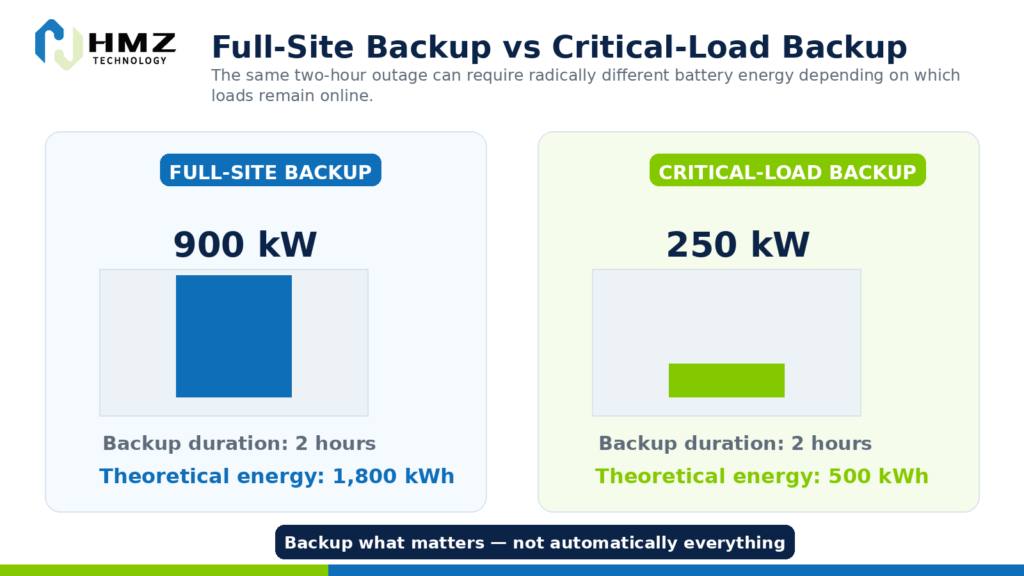
Total Facility Peak Demand: 900 kW
During an outage, however, only the following loads must continue:
- process controls: 30 kW
- refrigeration: 70 kW
- IT and communication: 20 kW
- safety systems: 10 kW
- selected production equipment: 120 kW
Total critical load:
250 kW
Designing backup for 250 kW is very different from designing for 900 kW.
If the required backup duration is two hours:
Full-Site Backup
900 kW × 2 h = 1,800 kWh
Critical-Load Backup
250 kW × 2 h = 500 kWh
These are simplified calculations before accounting for efficiency, SOC limits and design margin.
But the difference is already large.
Critical Load Backup Is Both a kW and kWh Problem
The backup design has two separate questions.
How Much Power Is Needed?
This is the critical-load requirement in kW.
If critical equipment requires 250 kW simultaneously, the battery PCS must be able to support that power level.
How Long Must It Run?
This determines the required energy in kWh.
If 250 kW must operate for:
- 30 minutes → 125 kWh
- 1 hour → 250 kWh
- 2 hours → 500 kWh
- 4 hours → 1,000 kWh
This is why understanding kW and kWh in commercial energy storage is essential in backup-system design.
Not Every Critical Load Has to Start at the Same Time
Another common mistake is to add the nameplate power of every critical device and assume the battery must supply all of them at once.
That may overestimate the requirement.
The project should check:
- simultaneous operation,
- startup sequence,
- motor inrush,
- duty cycle,
- load priority.
Suppose three pumps are considered critical.
Each is rated at 40 kW.
But only two are expected to run simultaneously.
The practical steady-state requirement may be closer to:
80 kW
rather than:
120 kW
However, motor starting current can create short high-power events.
So both continuous power and transient power should be reviewed.
Startup Loads Can Be More Important Than Steady Loads
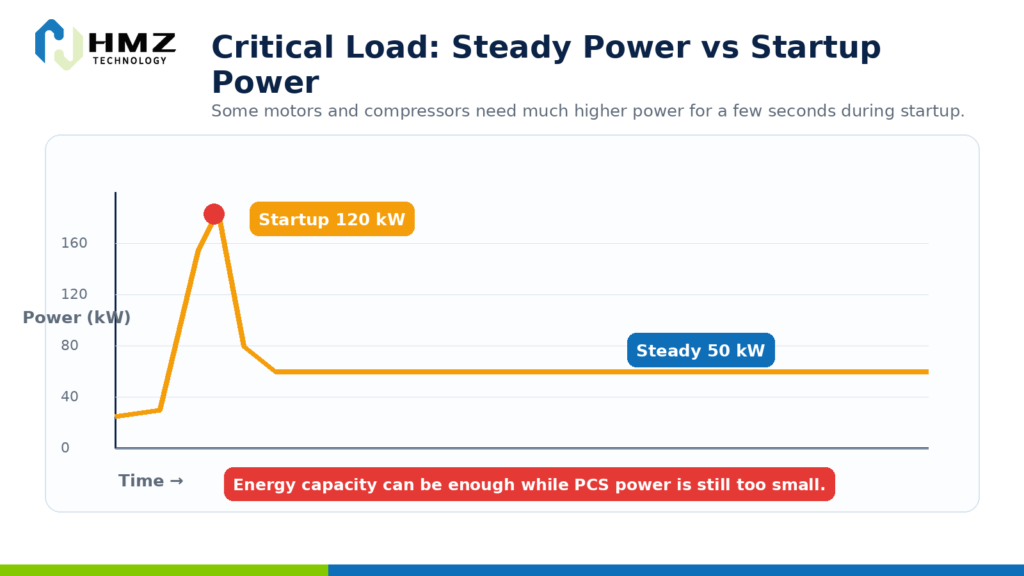
Some equipment draws significantly more power during startup.
Examples include:
- motors,
- compressors,
- pumps,
- HVAC equipment,
- transformers.
A refrigeration compressor may operate normally at 50 kW but require a much higher short-duration startup current.
If the BESS cannot support that transient event, the load may fail to start even if the battery has enough energy.
This is why critical-load analysis should include:
- steady-state kW,
- startup kW,
- startup duration,
- starting method,
- sequence.
Battery energy capacity alone does not solve every backup problem.
How to Classify Loads into Priority Levels
For more complex commercial sites, a simple critical / non-critical split may not be enough.
A three-level structure can work better.
Priority 1 — Must Stay Online
Examples:
- life-safety systems,
- control systems,
- critical IT,
- essential refrigeration,
- emergency communication.
These loads should receive backup first.
Priority 2 — Important but Sheddable
Examples:
- selected production equipment,
- partial HVAC,
- secondary pumps.
These loads can operate if sufficient battery power and energy remain.
Priority 3 — Non-Essential
Examples:
- decorative lighting,
- EV charging,
- non-essential office loads,
- optional process equipment.
These can be disconnected during an outage.
This priority structure allows the EMS or microgrid controller to manage limited stored energy more intelligently.
Load Shedding Can Extend Backup Duration
Imagine a battery has 600 kWh of usable energy available at the start of an outage.
If the facility keeps:
300 kW
of load online, simplified backup duration is:
600 kWh ÷ 300 kW = 2 hours
If non-essential loads are shed and demand falls to:
150 kW
the same energy can theoretically support:
4 hours
The battery did not become larger.
The load became smarter.
That is one of the biggest advantages of a properly designed microgrid.
For the broader system-design logic, see our commercial microgrid design process.
Critical Loads Can Change During a Long Outage
Backup requirements may change with outage duration.
For example:
First 15 Minutes
Keep everything essential online while operators respond.
After 30 Minutes
Disconnect secondary HVAC and non-essential production.
After 1 Hour
Reduce the site to essential safety, control and refrigeration loads.
That creates a staged backup strategy.
A battery system does not necessarily need to support the same load for the entire outage.
This can reduce required energy capacity while preserving resilience.
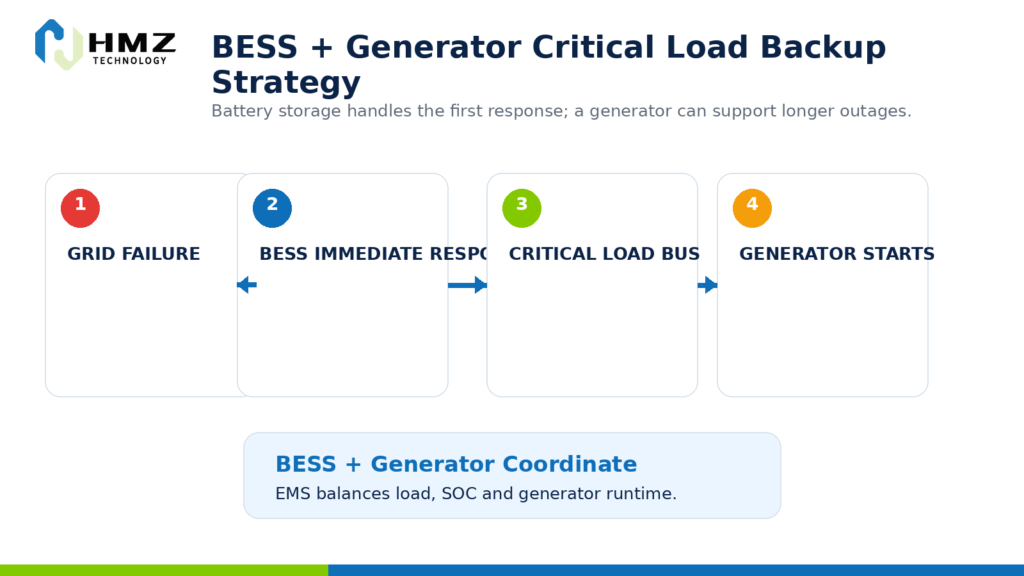
Battery Backup and Generator Backup Can Work Together
Some commercial facilities already have diesel generators.
Battery storage does not necessarily need to replace them.
A hybrid strategy may be more practical.
During a grid outage:
First Stage
Battery responds immediately.
Second Stage
Generator starts if the outage continues.
Third Stage
Battery and generator coordinate according to load and SOC.
This can help:
- reduce generator runtime,
- avoid inefficient low-load generator operation,
- provide fast response,
- preserve battery energy for critical moments.
For weak-grid or longer-duration backup projects, battery + generator integration can be more practical than trying to cover every outage entirely with batteries.
What Happens to Solar During a Grid Outage?
A common assumption is:
“We already have solar, so the solar system will keep working during an outage.”
Not always.
Many existing commercial PV systems use grid-following inverters.
When utility power disappears, those inverters normally shut down for anti-islanding protection.
To use PV during backup operation, the system may need:
- grid-forming capability,
- appropriate inverter or PCS architecture,
- islanding control,
- protection,
- EMS,
- switching.
This is why solar + battery does not automatically equal backup.
For existing PV sites, see our guide on adding battery storage to an existing commercial solar system.
The Role of EMS in Critical Load Backup
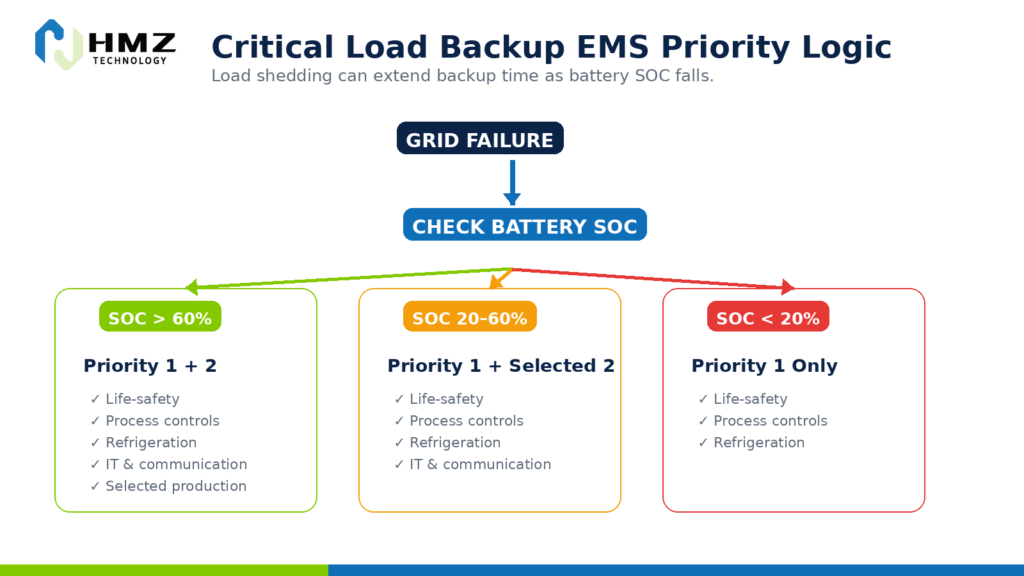
The EMS or microgrid controller can decide which loads remain online based on system conditions.
Inputs may include:
- grid status,
- battery SOC,
- PV generation,
- generator status,
- critical-load demand,
- outage duration.
A simple control strategy may look like this:
Grid Available
Normal operation.
Grid Fails
Switch to backup mode.
Battery SOC > 60%
Priority 1 + Priority 2 loads remain online.
Battery SOC < 40%
Priority 2 loads begin to shed.
Battery SOC < 20%
Only Priority 1 loads remain.
The exact thresholds are project-specific.
But the logic illustrates an important point:
backup duration is not only a battery-size question. It is also a control question.
How Critical Load Analysis Prevents Battery Oversizing
Suppose a customer says:
We want four hours of backup for our factory.
Without load classification, the design team might use the entire facility demand.
That can create a very large battery.
But after reviewing the site, perhaps only 25% of the load is truly critical.
The system requirement may fall dramatically.
This is one of the reasons battery oversizing happens.
A Practical Critical Load Backup Example
Consider a food-processing facility.
Normal site load:
700 kW
Critical equipment:
- cold-room refrigeration: 100 kW
- process controls: 20 kW
- essential pumps: 35 kW
- emergency lighting: 10 kW
- IT and communication: 15 kW
- one critical production line: 120 kW
Total critical load:
300 kW
Required backup duration:
2 hours
Simplified theoretical energy:
300 kW × 2 h = 600 kWh
But the final design must also consider:
- startup power,
- battery usable SOC,
- efficiency,
- degradation margin,
- load sequence,
- PV contribution,
- generator availability.
The 600 kWh calculation is a starting point.
It is not a final design.
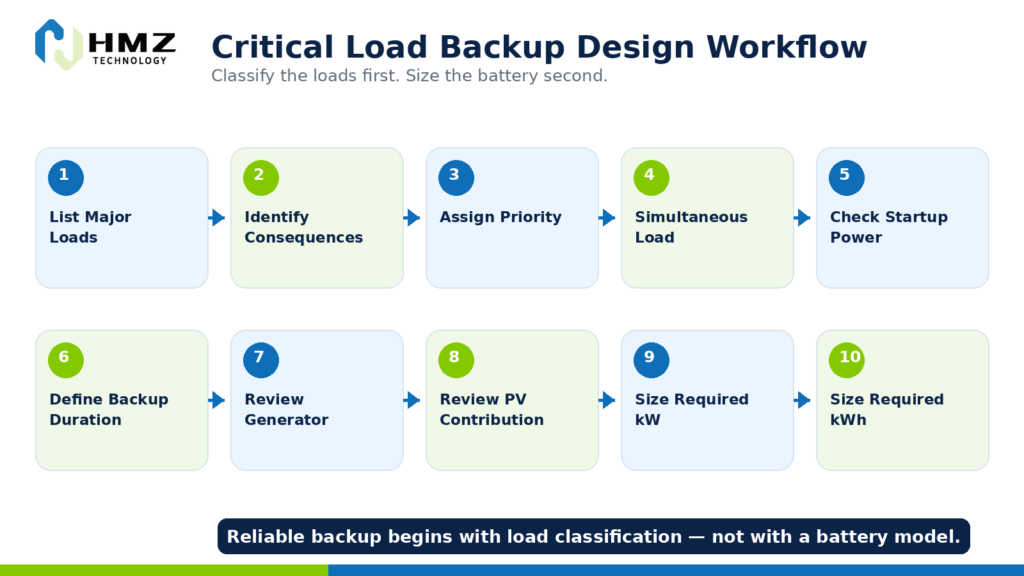
How to Perform a Critical Load Backup Assessment
Step 1 — List All Major Loads
Record equipment power and operating function.
Step 2 — Identify Operational Consequences
Ask what happens if each load stops.
Step 3 — Assign Priority
Priority 1, 2 or 3.
Step 4 — Determine Simultaneous Load
Find how many critical loads need to operate together.
Step 5 — Check Startup Power
Review motors, compressors and pumps.
Step 6 — Define Backup Duration
Decide how long each priority group should run.
Step 7 — Review Existing Generator
Determine whether generator support is available.
Step 8 — Review PV Contribution
Confirm whether solar can operate in island mode.
Step 9 — Define Required BESS kW
Based on simultaneous and transient power.
Step 10 — Define Required BESS kWh
Based on load duration and control strategy.
How HMZ Technology Approaches Critical Load Backup
For commercial and industrial backup projects, HMZ needs more than the site’s total electricity demand.
Useful project information includes:
- total facility load,
- list of critical equipment,
- steady-state kW,
- startup power,
- required backup duration,
- existing PV,
- generator capacity,
- grid conditions,
- single-line diagram,
- switching requirements.
From there, the system can define:
required backup power
and
required usable energy
before matching the requirement to a storage configuration.
HMZ’s current C&I storage portfolio includes:
50kW / 112kWh All-in-One C&I ESS
Suitable for smaller commercial and distributed backup applications.
125kW / 241kWh All-in-One C&I ESS
Suitable for larger C&I loads and commercial energy-management projects.
125kW / 261kWh Liquid-Cooled C&I ESS
Suitable for higher-duty applications requiring more precise thermal management.
Learn more about our 50kW/112kWh and 125kW/241kWh All-in-One C&I Energy Storage Systems.
For higher-duty projects, see the 125kW/261kWh Liquid-Cooled C&I Energy Storage System.
Critical Load Backup Checklist
Load Classification
- Priority 1 loads identified
- Priority 2 loads identified
- Non-critical loads identified
Power
- steady-state kW confirmed
- simultaneous load confirmed
- startup power confirmed
- motor loads reviewed
Energy
- backup duration defined
- SOC reserve defined
- efficiency considered
- degradation margin considered
System Integration
- switching method reviewed
- PV islanding capability reviewed
- generator integration reviewed
- EMS logic defined
Electrical Design
- critical-load panel / bus identified
- protection reviewed
- grid reconnection strategy reviewed
A backup system becomes much easier to size once the critical load is known.
Conclusion
A good commercial backup design does not begin with:
“How large is the building?”
It begins with:
“Which loads must stay online?”
That is the core of critical load backup design.
Separating critical and non-critical loads can reduce:
- required PCS power,
- required battery energy,
- system CAPEX,
- unnecessary idle capacity.
At the same time, it can improve resilience by ensuring stored energy is reserved for the equipment that matters most.
The battery should not automatically support everything.
It should support the right loads for the right amount of time.
Asked Questions
What is a critical load?
A critical load is electrical equipment that must continue operating during a grid outage because interruption could create safety, operational, financial or product-loss consequences.
What is a non-critical load?
A non-critical load can be temporarily disconnected during an outage without creating unacceptable consequences.
Why should critical loads be separated before BESS sizing?
Separating critical loads prevents the backup battery from being sized around unnecessary equipment and can significantly reduce required power and energy capacity.
Does every critical load need to run at the same time?
Not necessarily. Simultaneous operation, startup sequence and duty cycle should be reviewed before calculating the final backup power requirement.
Can solar supply critical loads during an outage?
Potentially, but the system must support island operation. Many existing grid-following PV systems shut down when the utility grid fails.
Can a generator and battery work together for backup?
Yes. A battery can provide immediate response while a generator supports longer outages, depending on the system design and control strategy.
Build Your Intelligent Energy Future with HMZ
HMZ Technology helps businesses move beyond traditional solar systems by combining solar PV, battery storage and intelligent microgrid control.
Our integrated energy solutions are designed for industrial facilities, commercial buildings and remote energy applications requiring reliable, efficient and flexible power.
Contact HMZ Technology today to explore your next solar storage or microgrid project.
Related Insights from HMZ Technology
Industrial energy management is rapidly evolving. While rooftop solar PV provides an effective way for factories to generate clean electricity, many businesses are now looking beyond solar generation and exploring integrated solutions such as energy storage, intelligent energy management, and microgrid systems.
To better understand how commercial and industrial users can optimize their energy strategy, explore more insights from HMZ Technology’s renewable energy knowledge center, including solar PV solutions, C&I energy storage systems, and practical applications for industrial energy management.